I have wanted to move my blog into my personal site for a while. Actually, I wanted to do this last year, but like a lot of side projects, it kept sitting on the list. I would think about it, open the repo, look at the amount of work, and then convince myself that Hashnode was fine for now.
And honestly, Hashnode was fine. The issue was not that Hashnode was bad. The issue was that my blog felt separate from the rest of my site. My homepage, notes, speaking page, resume, and other things lived on rishabkumar.com, but the blog lived at blog.rishabkumar.com.
That always bothered me a little. I wanted the blog to be first-party content on my site. Same repo, same deploy, same styling, same domain.
This week, I finally did it. And the big reason it actually happened was Codex.
The Migration I Kept Avoiding
The annoying part about a migration like this is not one big thing. It is all the small things. You need to export the posts, preserve dates, slugs, tags, covers, and metadata, download images, make sure the Markdown still renders correctly, fix broken assets, and make sure old links redirect.
None of this is impossible, but it is enough work that it becomes easy to delay. That is exactly what I did.
Starting With The Hashnode API
The first thing we looked at was getting the posts out of Hashnode. Hashnode has a GraphQL API, but one important detail is that API access for publications requires Hashnode Pro, which is $5/month.
So I had to enable Pro on my publication, so we could use the GraphQL endpoint:
https://gql-beta.hashnode.com
That part matters. If you are trying to do this yourself and the API is returning something weird, confirm that Pro is enabled for the publication and that you are passing a valid personal access token.
Also, if you only need Pro for the migration, remember to cancel it after you are done. I needed it to get API access for the export, but once the content was moved, the images were local, and the redirects were working, there was no reason for me to keep paying for it.
At first, we tried using an existing export tool. It looked like it might solve the problem quickly, but it did not work for my setup. So we built our own.
Building the Export Script
The export script ended up being a small Node.js script:
scripts/export-hashnode.mjs
The goal was simple:
- pull published posts from Hashnode
- optionally pull drafts
- save the raw JSON
- save Markdown files
- download images locally
- save analytics data where the API exposed it
- log any image download failures
The command looked like this:
npm run export:hashnode -- --publication=blog.rishabkumar.com
We also added support for drafts:
npm run export:hashnode -- --publication=blog.rishabkumar.com --include-drafts
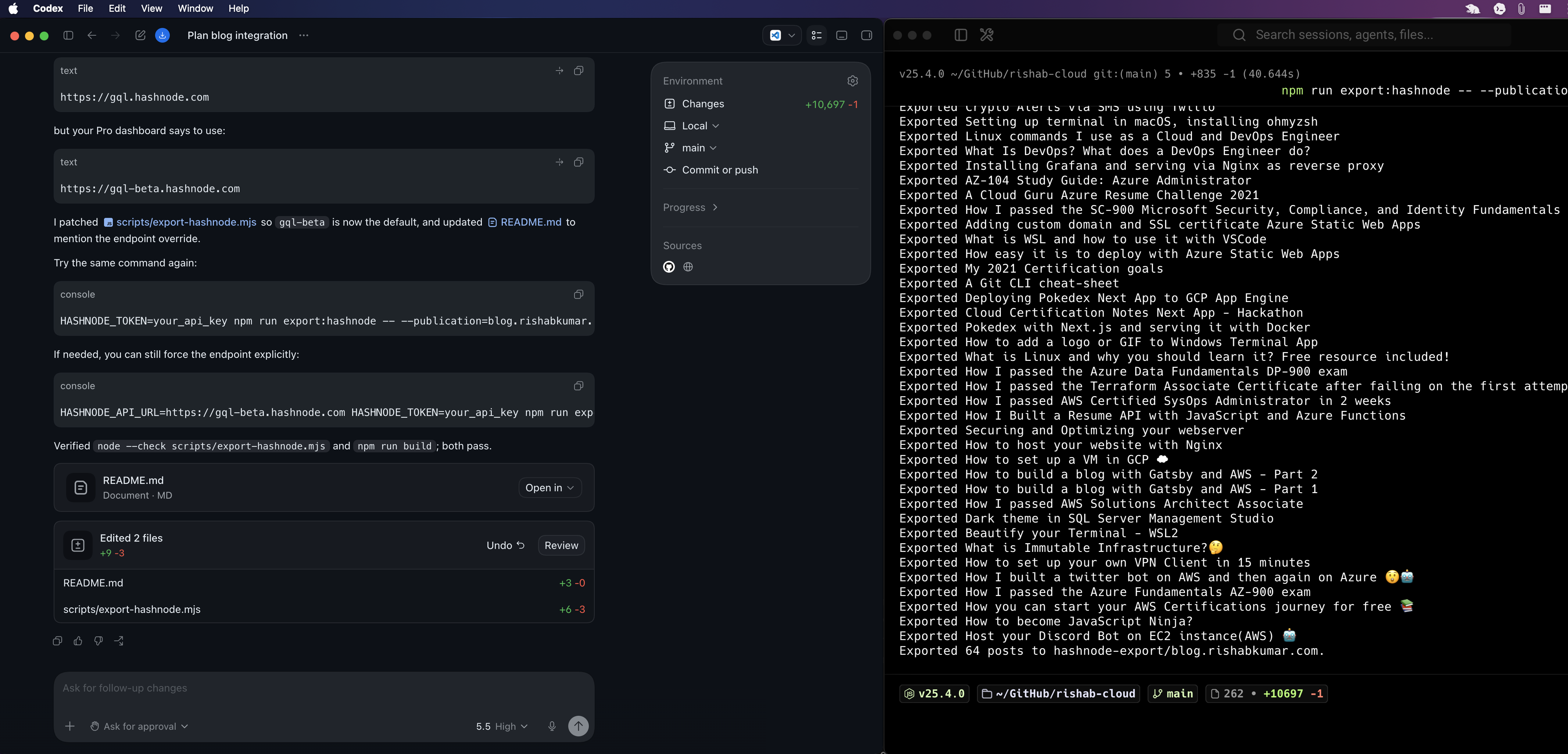
This gave me a local export with posts, drafts, images, analytics, and error logs. That was the first big unlock.
Once I had the content locally, the migration stopped feeling scary. It was not a vague “move my blog” task anymore. It was a folder of files we could inspect, fix, and import.
Images Were The Messy Part
Most of the images downloaded fine, but some did not. We saw a few 403 and 404 responses from old image URLs, so Codex helped list the broken image URLs and map them back to the posts they came from.
For two of them, I downloaded the images manually and dropped them into the export. One GIF was still missing, but I decided not to block the whole migration on one GIF.
That is one thing I appreciated about doing this with Codex. It was not just “write a script and good luck.” We could inspect the failures, update the export, rerun the import, and keep moving.
Importing Into Hugo
After the export worked, we built the import script:
scripts/import-hashnode-export.mjs
This script converted the Hashnode export into Hugo content. It writes posts to:
content/blog/
And it copies images to:
static/images/blog/
It also rewrites local image paths so the final posts can use URLs like:
/images/blog/some-post-slug/image.png
That was important because I did not want the new blog to depend on Hashnode CDN links forever. If the content is moving into my site, the assets should move too.
Keeping The Dates And Slugs
One thing I cared about was preserving the old URLs. If an old Hashnode post was:
https://blog.rishabkumar.com/some-blog-slug
I wanted the new URL to be:
https://rishabkumar.com/blog/some-blog-slug/
The import script kept the slug and added Hugo frontmatter for things like:
- title
- date
- last modified date
- description
- tags
- cover image
- original Hashnode URL
So the posts became normal Hugo Markdown files, but still carried enough metadata to trace them back to Hashnode if I ever need to.
Fixing The Site After Import
The import worked, but the first render was not perfect. Some things looked off.
The post description was showing directly under the title like a subheading, and I did not like that. The post metadata also had escaped HTML showing up on the page, so instead of a clean date line, I saw something like <span title=...>.
Then we noticed body text wrapping badly. Some words were splitting in weird places because the theme had a global paragraph rule using word-break: break-all.
Codex helped trace each issue to the right Hugo template or CSS file:
single.htmlwas rendering.Descriptionunder the headingpost_meta.htmlneeded the metadata HTML to be rendered safelyfooter.csshad a global paragraph rule that affected blog contentpost-single.cssneeded better article text wrapping
These were small fixes, but they mattered. The migration was not done when the content imported. It was done when the posts actually felt good to read.
Archiving The Raw Export
I did not want to keep the raw Hashnode export inside my website repo, so I moved the full export into a separate repository:
blog.rishabkumar.com
That repo has the raw JSON, Markdown, images, drafts, analytics, and export logs. My website repo only keeps the content that is needed to build the site.
That feels cleaner. The export repo is the archive. The website repo is the site.
Setting Up Redirects
After the new blog was deployed, the final step was redirects. The rule is simple:
blog.rishabkumar.com/* -> rishabkumar.com/blog/*
I set this up in Cloudflare as a redirect rule. I first used a 302 temporary redirect while testing, because I wanted to confirm the pattern worked before making it permanent.
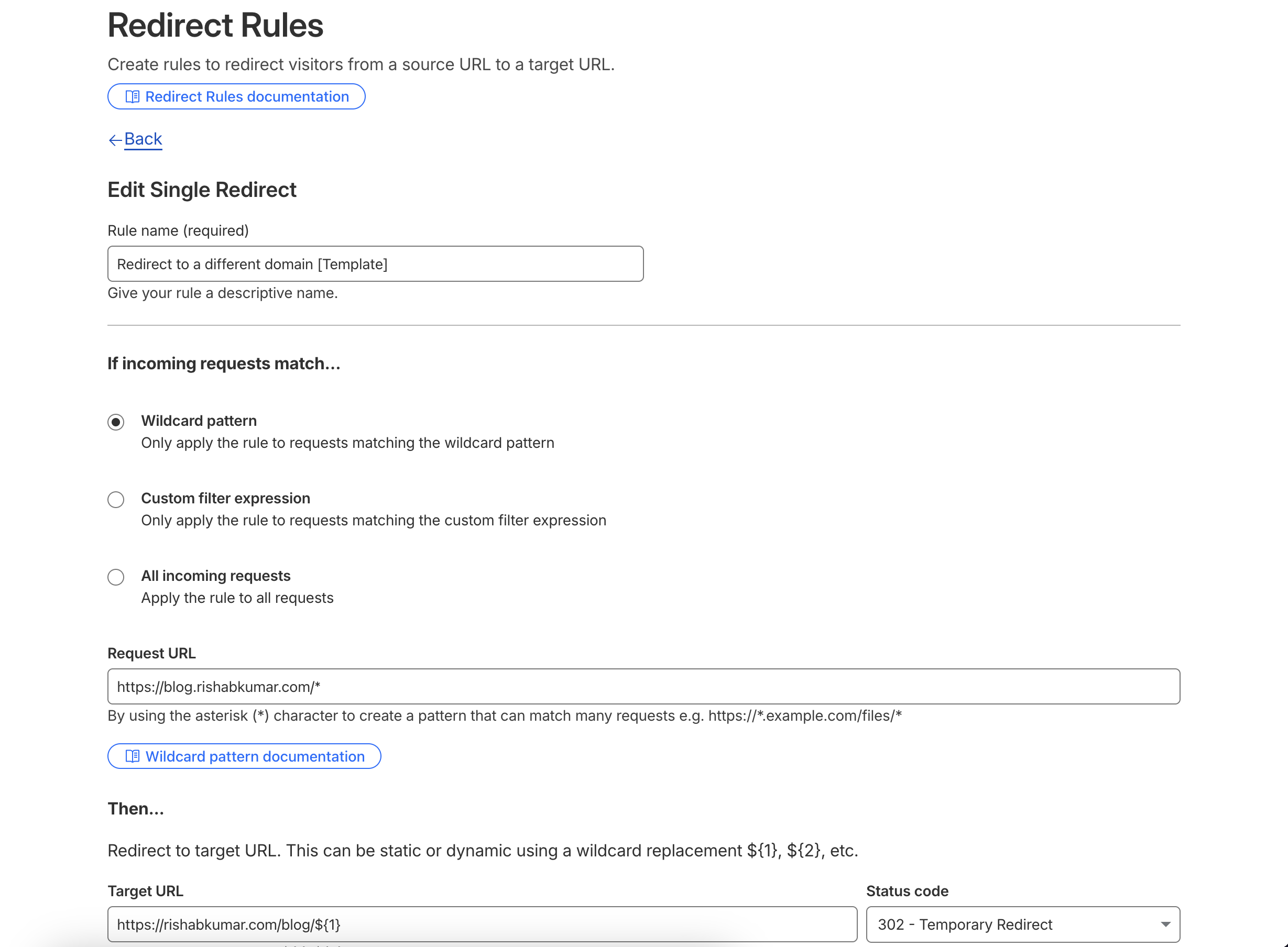
After I tested a few old posts and confirmed they landed on the right new URLs, I switched the rule to a 301 permanent redirect. So now an old URL like:
https://blog.rishabkumar.com/getting-more-out-of-codex
Redirects to:
https://rishabkumar.com/blog/getting-more-out-of-codex/
That part was important because I did not want old links from Twitter, LinkedIn, Google, or other sites to break. Once I tested a few old posts and confirmed they redirected correctly, the migration was basically live.
What Codex Changed For Me
This is the part I keep coming back to. I could have done this migration myself, but I did not. Not because it was too hard, but because it was annoying enough to keep delaying.
Codex helped turn it into a sequence of smaller tasks:
- inspect the current Hugo site
- build a Hashnode export script
- debug API access
- download and verify images
- export drafts and analytics
- build an import script
- fix rendering issues
- verify the generated site
- clean up the repo
- plan the redirect
That is where AI coding tools feel most useful to me right now. Not just writing code from a prompt, but helping move a project through all the little steps that usually make me procrastinate.
The work still needed judgement. I still had to decide what to keep, what to ignore, when to manually replace images, when to archive files, and how I wanted the final blog to feel.
But Codex made the boring parts lighter. And because of that, a migration I had been putting off since last year is finally done.
Final Thoughts
If you are thinking about moving your blog off a hosted CMS and into your own site, my advice is simple: do the export first.
Once you have your content locally, everything gets easier. You can inspect it, back it up, script against it, and fix things one at a time.
Also, check the API access requirements before you start. In my case, Hashnode Pro was required for the publication API access, and that was an important piece of the puzzle.
For me, this migration was less about leaving Hashnode and more about bringing my blog home. Now my posts live with the rest of my site, and honestly, it feels good to finally cross this one off the list.